Tutorial: Connect LDROBOT LD14P LiDAR to Raspberry Pi (Python)
Stream live distance data from an LDROBOT LD14P 2D LiDAR on a Raspberry Pi 4 or 5 using Python and pyserial. Wiring, UART setup, and full source code.

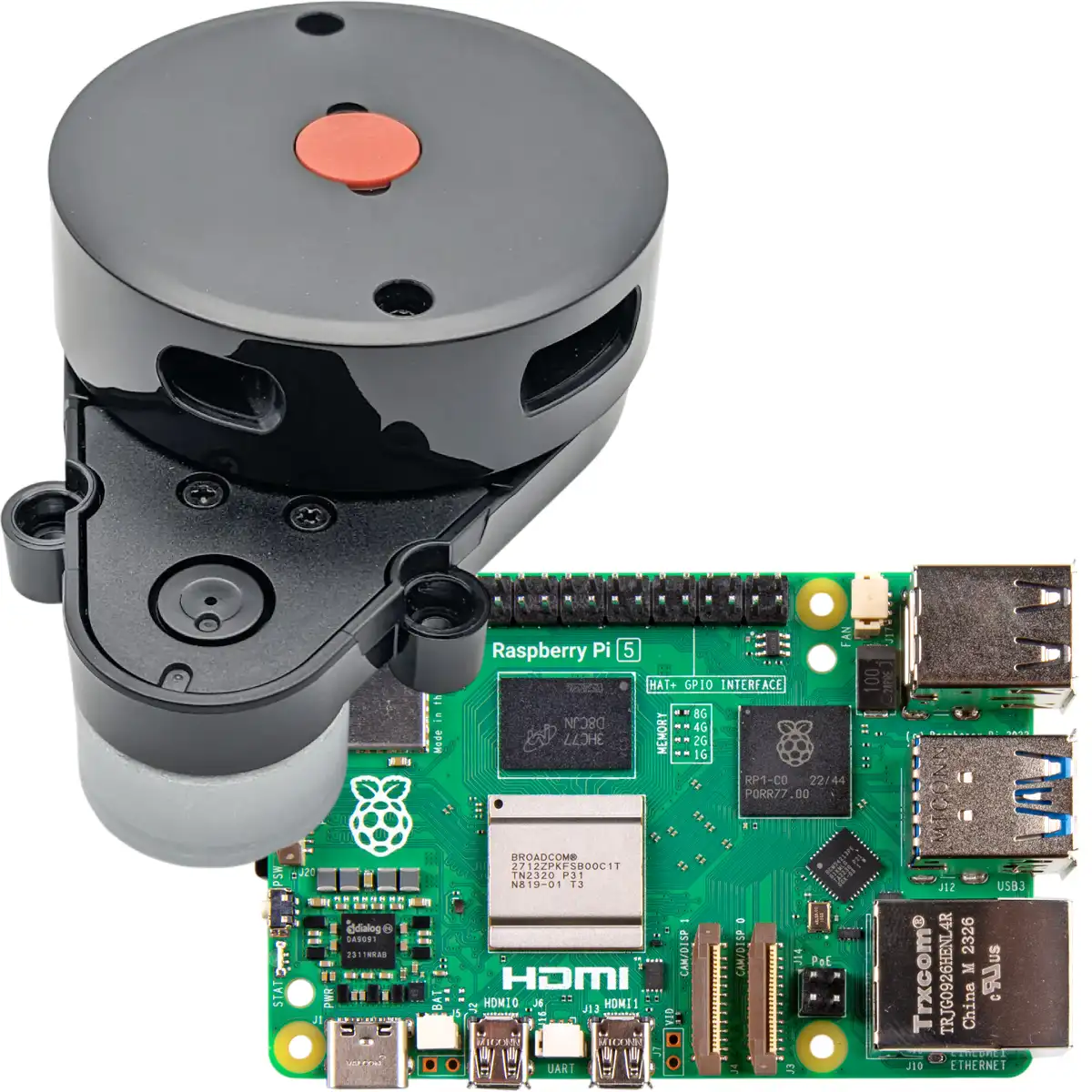
Our existing tutorials cover connecting the LDROBOT LD14P 2D LiDAR to an ESP32 with Arduino. This one is the Raspberry Pi counterpart: read live distance data on a Pi 4 or Pi 5 with a small Python script. No microcontroller in the middle.
All functionality in this article is now available as a Python
lds2dlibrary.
Tested: we ran this end-to-end on a Raspberry Pi 5 over the GPIO serial port — the LD14P streams clean packets with the exact steps below. The Pi 4 path and the USB-to-serial option use the same protocol and the LD14P datasheet wiring; if you hit a snag on those, bug reports are welcome on our support forum.
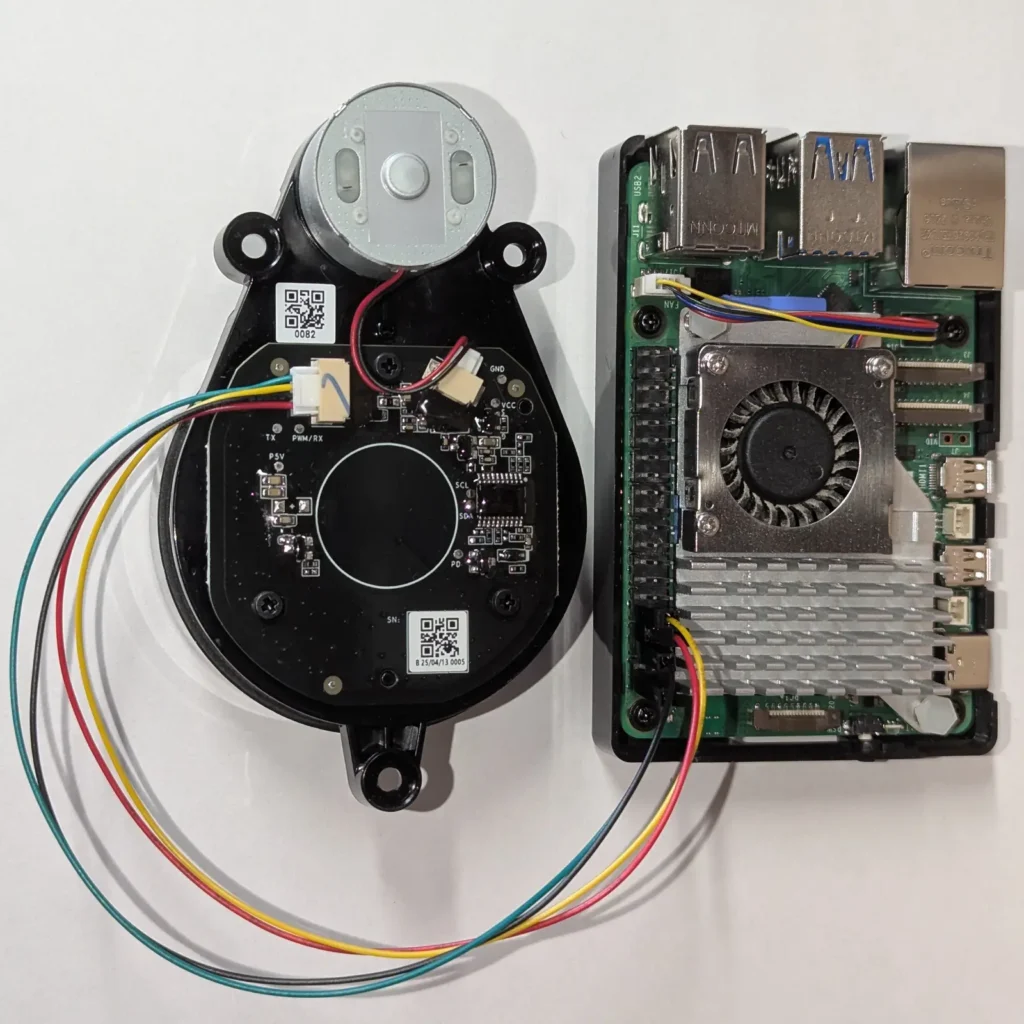

This is Part 1 — wiring the LD14P and reading its data. Once you have scans streaming, Part 2: Control the LD14P Motor shows how to stop, start, and set the scan speed from Python.
When to use a Pi instead of an ESP32
| ESP32 | Raspberry Pi | |
|---|---|---|
| Cost | $5–10 | $45–305 (board only) |
| Power | Battery-friendly, ~200 mW | Wall-powered, ~3–5 W |
| Processing | Streams raw data — heavy compute lives on a PC | Can run SLAM, vision, ROS 2 locally |
| Mobile robot fit | Excellent | Heavier — needs a bigger battery |
| Standalone dev rig | OK with PC | Excellent — self-contained Linux box |
Pricing note (May 2026): a global memory shortage has pushed Raspberry Pi 5 board prices well above their launch MSRPs. Board-only prices are currently around $45 (1 GB), $65 (2 GB), $110 (4 GB), $175 (8 GB), up to $305 (16 GB). Retail kits that add a case, the official USB-C power supply, and an SD card run $30–60 more, which is why marketplace listings often look higher still. The good news for this project: reading LiDAR needs almost no RAM, so the cheapest 1 GB or 2 GB board is plenty. These numbers are unusually volatile right now — check the official Raspberry Pi 5 page for live pricing.
Pick the Pi when you want a self-contained Linux node running Python (or ROS 2) right on the robot. Pick the ESP32 when you want low cost, low power, and a host PC doing the heavy lifting.
What you’ll need
- LDROBOT LD14P LiDAR — available in our store, ships with the JST GH 4-pin breakout cable
- Raspberry Pi 4 or Pi 5 running Raspberry Pi OS (Bookworm or newer)
- A Pi power supply with ~300 mA of headroom — the LD14P’s motor and laser draw roughly 300 mA on top of the Pi’s own consumption. The official USB-C PSU (27 W for the Pi 5, 15 W for the Pi 4) has ample margin; a marginal phone charger can brown out and corrupt the serial stream.
- Either GPIO UART wiring (no extra hardware), or a 3.3 V USB-to-serial adapter (FTDI / CH340 / CP2102)
- 4 jumper wires (with the included DuPont breakout cable)
Wiring
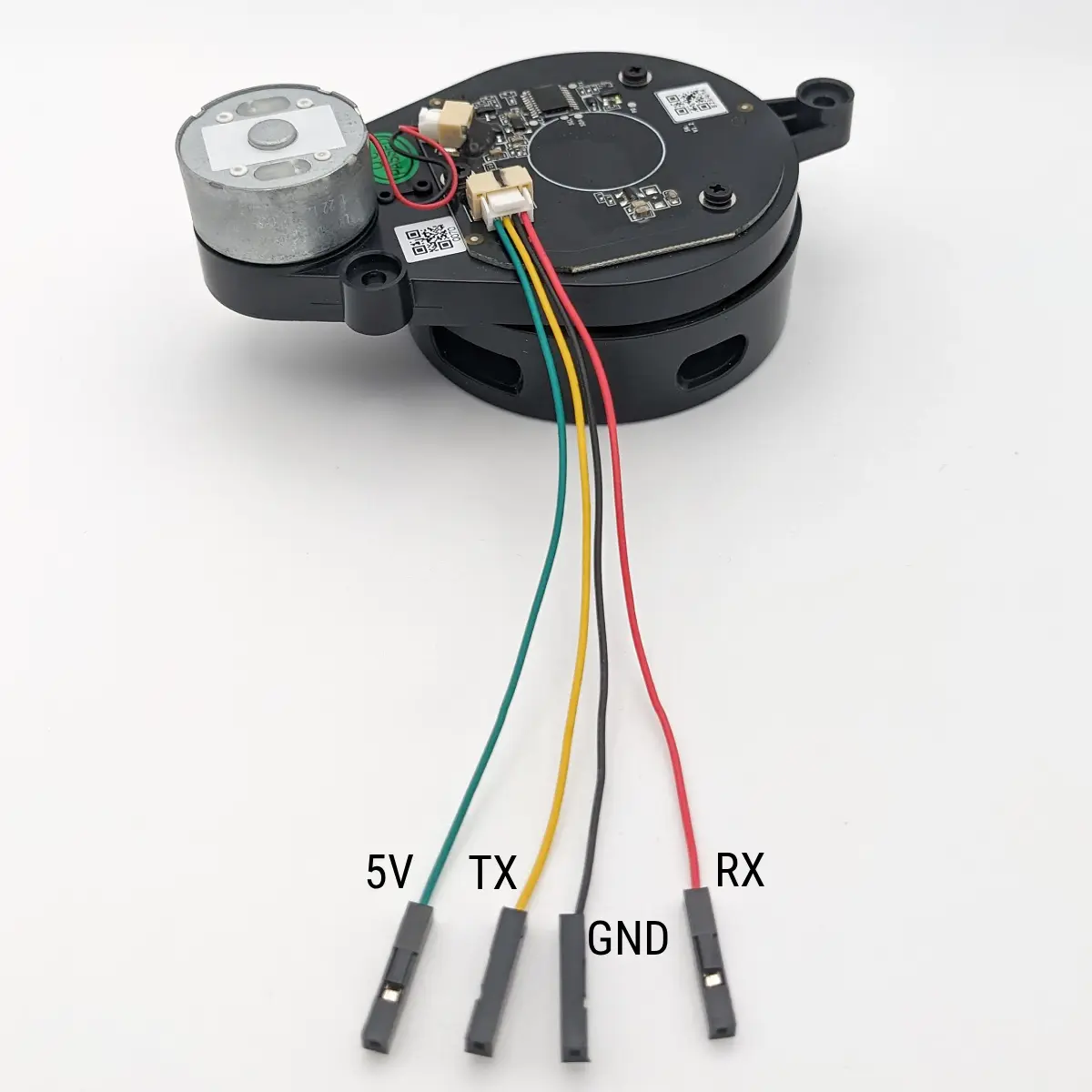
The LD14P has 4 pins on its JST GH connector: TX (UART out from the LiDAR), RX (UART in — for optional speed-control commands), 5V, and GND. The breakout cable that ships with the LD14P labels them as shown below:
Option A: direct to Pi GPIO (UART)
| LD14P cable | Pi 4 / Pi 5 GPIO | Board pin |
|---|---|---|
| 5V | 5 V | pin 2 or 4 |
| GND | GND | pin 6 |
| TX | GPIO 15 (RXD) | pin 10 |
| RX | leave unconnected (or GPIO 14 / TXD on pin 8 if you want to send commands) | — |
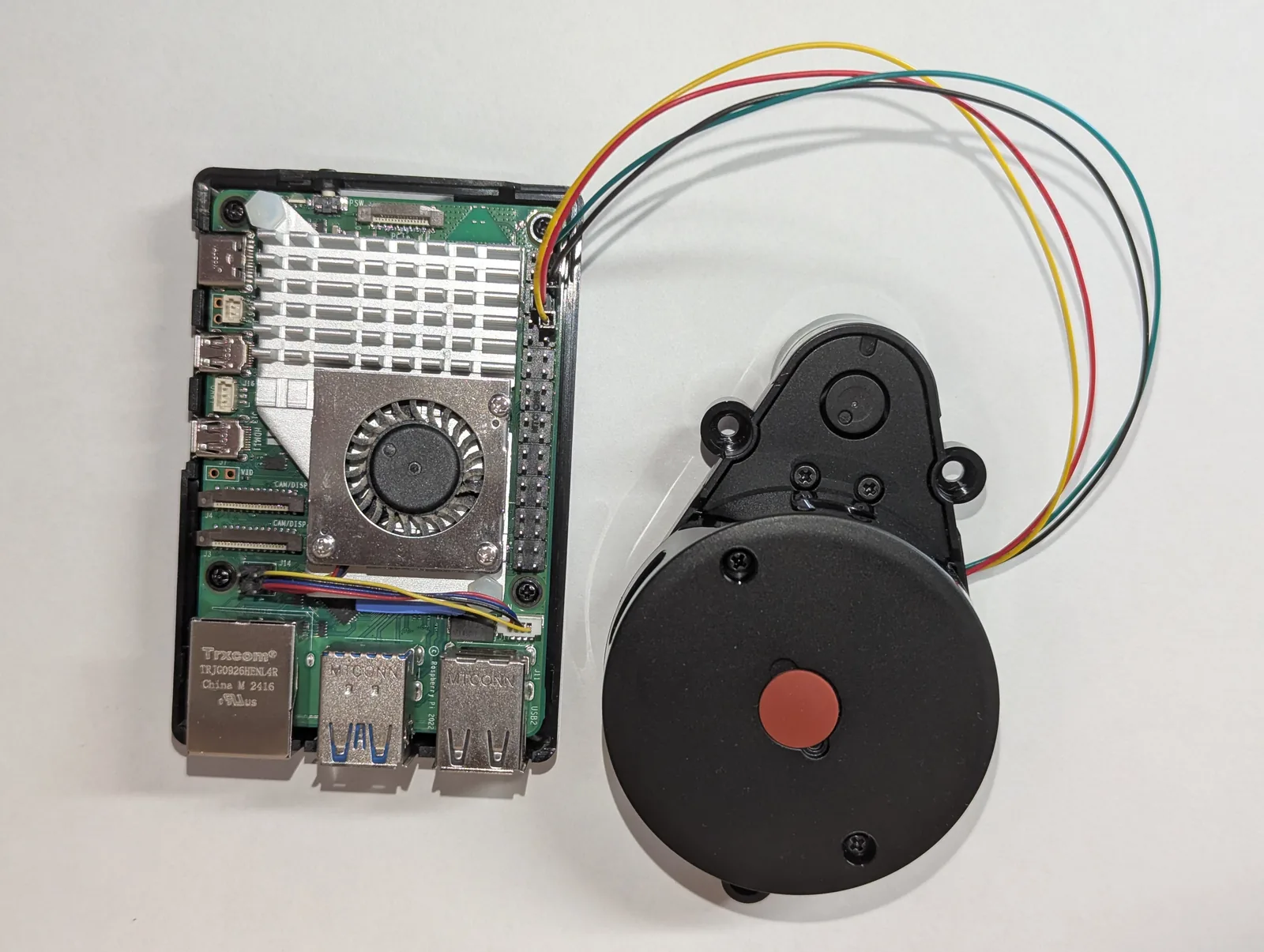
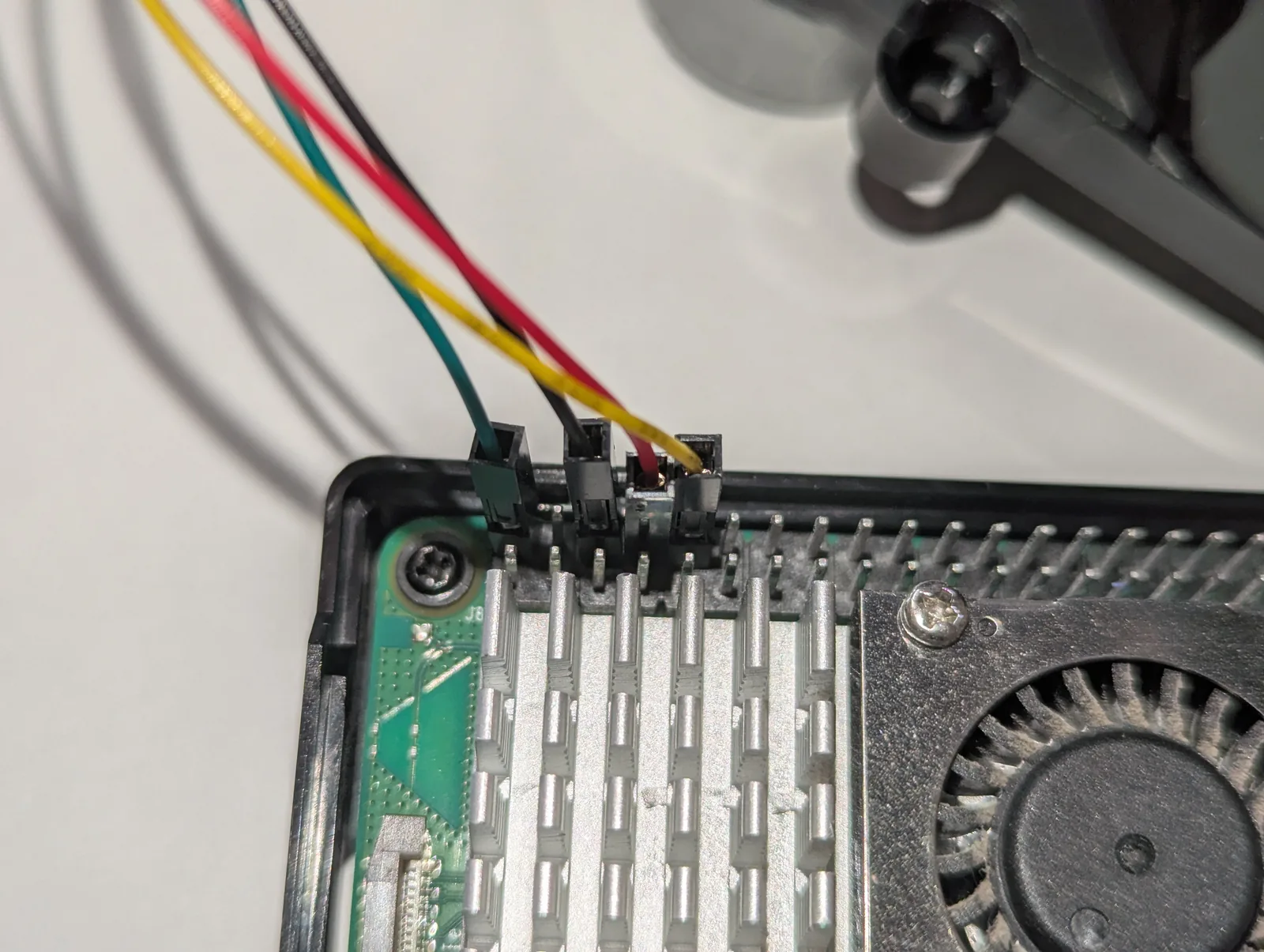
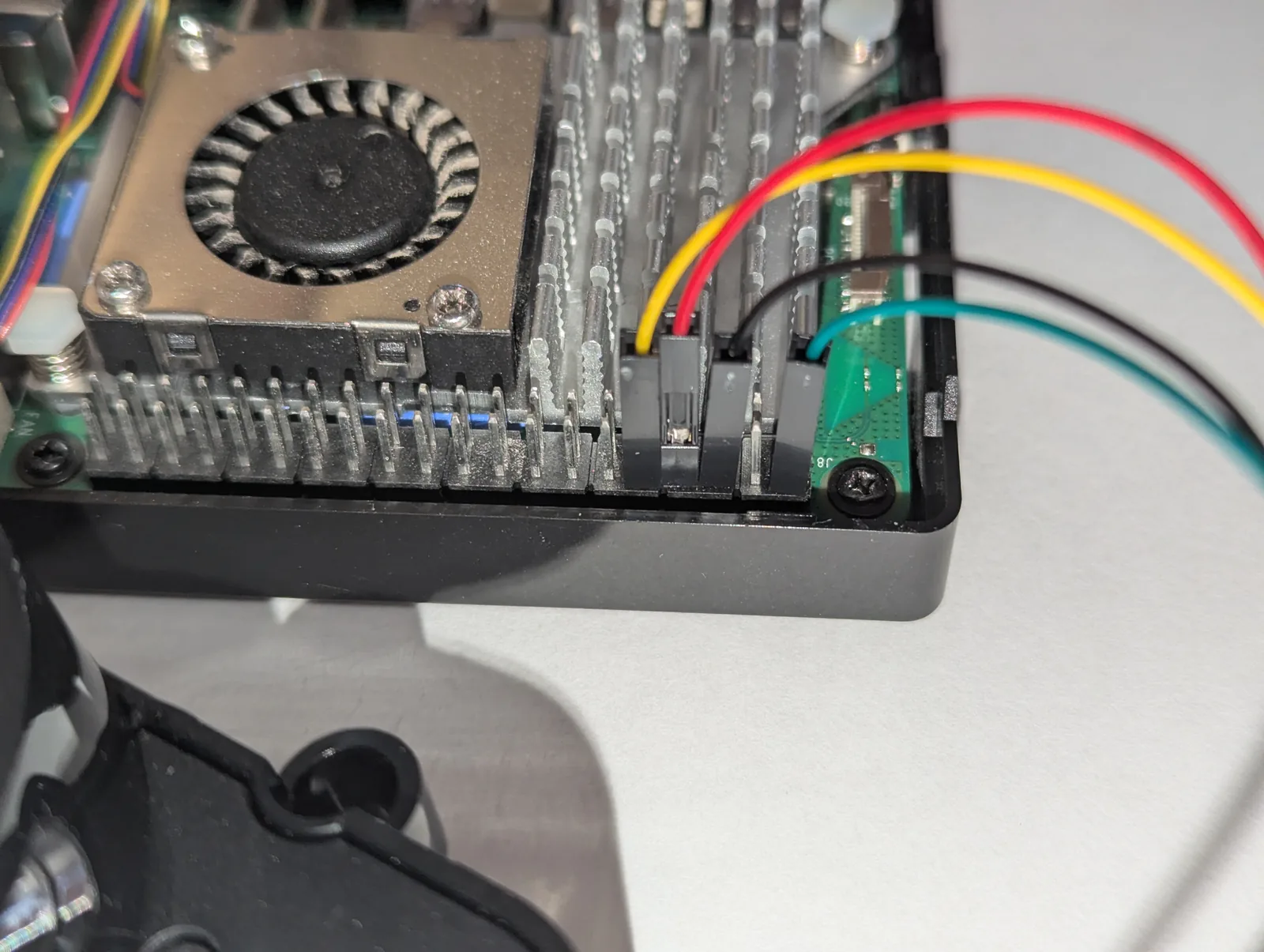
The LD14P starts streaming at its default ~6 Hz scan rate as soon as it’s powered — no initialization commands required. The RX pin only matters if you later want to change the rotation speed (or stop the motor) via UART commands; for the read-only tutorial here, leave it disconnected.
The Pi’s GPIO is 3.3 V-tolerant on inputs, and the LD14P’s TX is 3.3 V CMOS, so no level-shifter is needed.
Option B: USB-to-serial adapter
If you want to keep the Pi’s GPIO UART for something else (or just hate fiddling with raspi-config), use a 3.3 V USB-to-serial adapter:
| LD14P cable | USB-to-serial adapter |
|---|---|
| 5V | 5 V (from adapter or external supply) |
| GND | GND |
| TX | RX |
| RX | leave unconnected (or adapter TX if you want to send commands) |
Plug it into one of the Pi’s USB ports. The device shows up as /dev/ttyUSB0.
One-time Pi setup
If you’re on a USB-to-serial adapter (Option B), there’s nothing to configure here — the adapter shows up as /dev/ttyUSB0 on its own. Just add yourself to the dialout group (see the last step below) and skip to Install pyserial. The GPIO UART steps that follow are only for Option A.
Get new tutorials by email
GPIO UART (Option A): enable the port
sudo raspi-configNavigate to Interface Options → Serial Port and answer:
- “Would you like a login shell to be accessible over serial?” — No
- “Would you like the serial port hardware to be enabled?” — Yes
Reboot, then check what /dev/serial0 actually points to — this one command decides whether you’re done or have one more step:
ls -l /dev/serial0- If it points to
-> ttyAMA0, the GPIO UART is live. You’re done with this section — jump to the dialout step below. - If it points to
-> ttyAMA10(common on the Raspberry Pi 5),serial0is aimed at the wrong UART. Work through the Pi 5 section next.
Raspberry Pi 4
On the Pi 4, enabling the serial hardware in raspi-config usually routes /dev/serial0 straight to the GPIO header UART (ttyAMA0), and you’re done. If serial0 is being held by Bluetooth instead, add dtoverlay=disable-bt to /boot/firmware/config.txt and reboot — that frees the “good” PL011 UART for the GPIO pins. (disable-bt is a Pi 4 fix only; it does nothing on the Pi 5, where Bluetooth isn’t wired to GPIO14/15.)
Raspberry Pi 5
The Pi 5 has a quirk that trips up almost everyone: enabling “serial hardware” in raspi-config lights up the dedicated debug UART (the small 3-pin JST header near the power/PCIe connectors), which becomes /dev/ttyAMA10. Your LiDAR is wired to GPIO15 (pin 10), which is a different UART: /dev/ttyAMA0. So serial0 ends up pointing at the debug header where nothing is connected, and you get silence despite perfect wiring.
Step 1 — route GPIO14/15 to ttyAMA0. Edit the firmware config:
sudo nano /boot/firmware/config.txtMake sure both of these lines are present (add whichever are missing):
enable_uart=1
dtparam=uart0=on
dtparam=uart0=on is the key line — it’s what actually maps GPIO14/15 to /dev/ttyAMA0 on the Pi 5. enable_uart=1 on its own leaves you stuck on the debug port.
Step 2 — free the port from the serial console. Once serial0 points to ttyAMA0, the boot console can land right on top of your LiDAR port (you’ll see ttyAMA0 owned root tty with mode crw-------, and reads fail with permission denied). Even with “login shell over serial = No”, a console= token can linger in the kernel command line:
sudo nano /boot/firmware/cmdline.txtThis file is a single line — do not add line breaks. Remove only the console=serial0,115200 token (it may instead read console=ttyAMA0,115200). Leave console=tty1 — that’s your HDMI console — and everything else intact. Then disable the matching login service:
sudo systemctl disable --now [email protected]Step 3 — reboot and verify:
sudo reboot
# after it comes back up:
ls -l /dev/serial0      # should now read: serial0 -> ttyAMA0
ls -l /dev/ttyAMA0      # should be: crw-rw---- 1 root dialout   (NOT root tty)
When ttyAMA0 shows root dialout (not root tty), the console is off the port and the LiDAR data has a clear path. serial0 now resolves to the right UART, so the script’s /dev/serial0 default just works.
Confirm raw data is flowing. Set the baud rate and dump a few bytes — at 230 400 you should see the repeating 54 2c packet header (every 47 bytes):
stty -F /dev/ttyAMA0 230400 raw -echo
timeout 3 cat /dev/ttyAMA0 | xxd | head
A healthy dump looks like this (the 54 2c pairs are the packet headers — here at offsets 0x11, 0x40, and 0x6f):
00000000: 1b03 d203 00a0 c100 94c2 008a 516c 4438  ............QlD8
00000010: 1c54 2c6e 0887 6cc3 008a c500 8800 00dc  .T,n..l.........
00000020: 0000 dc00 00dc bc01 a2df 01ce ef01 d800  ................
00000030: 00ba 0000 a000 0094 0000 8ad8 6e47 38a6  ............nG8.
00000040: 542c 6e08 0e6f 0000 8a00 0088 fe00 62f6  T,n..o........b.
00000050: 007e ef00 6ee1 006a dd00 90e7 007a dc00  .~..n..j.....z..
00000060: 8ad9 0084 e200 dadc 00c2 6171 4a38 8654  ..........aqJ8.T
00000070: 2c6e 0896 71d5 00da d700 dad3 00dc d400  ,n..q...........
If you get smeared bytes with no recurring 54 2c, the baud rate isn’t set (the stty setting doesn’t survive a reboot — pyserial sets it itself, so this only matters for the cat test) or you have a loose ground. If cat hangs with no output at all, the port is still on the wrong UART or held by the console — recheck the steps above.
Grant access (Pi 4 and Pi 5)
Add your user to the dialout group so you can read the port without sudo, then log out and back in (or reboot) for the group change to take effect:
sudo usermod -aG dialout $USERInstall pyserial
sudo apt update
sudo apt install python3-serial
Or via pip if you prefer venvs:
pip install pyserialThe Python script
Save the following as ld14p_pi.py — or grab it from the GitHub repo kaiaai/rpi5_ldrobot_ld14p, or download it as a zip, to skip the copy-paste:
#!/usr/bin/env python3
"""LDROBOT LD14P 2D LiDAR — Read & Print on Raspberry Pi."""

import sys
import struct
import argparse
import serial

PACKET_HEADER = 0x54
PACKET_VER_LEN = 0x2C  # version 1, 12 points per packet
POINTS_PER_PACKET = 12
PACKET_SIZE = 47
DEFAULT_BAUD = 230400

# CRC-8 table from the LDROBOT SDK (poly 0x4D)
CRC_TABLE = bytes([
    0x00, 0x4d, 0x9a, 0xd7, 0x79, 0x34, 0xe3, 0xae, 0xf2, 0xbf, 0x68, 0x25,
    0x8b, 0xc6, 0x11, 0x5c, 0xa9, 0xe4, 0x33, 0x7e, 0xd0, 0x9d, 0x4a, 0x07,
    0x5b, 0x16, 0xc1, 0x8c, 0x22, 0x6f, 0xb8, 0xf5, 0x1f, 0x52, 0x85, 0xc8,
    0x66, 0x2b, 0xfc, 0xb1, 0xed, 0xa0, 0x77, 0x3a, 0x94, 0xd9, 0x0e, 0x43,
    0xb6, 0xfb, 0x2c, 0x61, 0xcf, 0x82, 0x55, 0x18, 0x44, 0x09, 0xde, 0x93,
    0x3d, 0x70, 0xa7, 0xea, 0x3e, 0x73, 0xa4, 0xe9, 0x47, 0x0a, 0xdd, 0x90,
    0xcc, 0x81, 0x56, 0x1b, 0xb5, 0xf8, 0x2f, 0x62, 0x97, 0xda, 0x0d, 0x40,
    0xee, 0xa3, 0x74, 0x39, 0x65, 0x28, 0xff, 0xb2, 0x1c, 0x51, 0x86, 0xcb,
    0x21, 0x6c, 0xbb, 0xf6, 0x58, 0x15, 0xc2, 0x8f, 0xd3, 0x9e, 0x49, 0x04,
    0xaa, 0xe7, 0x30, 0x7d, 0x88, 0xc5, 0x12, 0x5f, 0xf1, 0xbc, 0x6b, 0x26,
    0x7a, 0x37, 0xe0, 0xad, 0x03, 0x4e, 0x99, 0xd4, 0x7c, 0x31, 0xe6, 0xab,
    0x05, 0x48, 0x9f, 0xd2, 0x8e, 0xc3, 0x14, 0x59, 0xf7, 0xba, 0x6d, 0x20,
    0xd5, 0x98, 0x4f, 0x02, 0xac, 0xe1, 0x36, 0x7b, 0x27, 0x6a, 0xbd, 0xf0,
    0x5e, 0x13, 0xc4, 0x89, 0x63, 0x2e, 0xf9, 0xb4, 0x1a, 0x57, 0x80, 0xcd,
    0x91, 0xdc, 0x0b, 0x46, 0xe8, 0xa5, 0x72, 0x3f, 0xca, 0x87, 0x50, 0x1d,
    0xb3, 0xfe, 0x29, 0x64, 0x38, 0x75, 0xa2, 0xef, 0x41, 0x0c, 0xdb, 0x96,
    0x42, 0x0f, 0xd8, 0x95, 0x3b, 0x76, 0xa1, 0xec, 0xb0, 0xfd, 0x2a, 0x67,
    0xc9, 0x84, 0x53, 0x1e, 0xeb, 0xa6, 0x71, 0x3c, 0x92, 0xdf, 0x08, 0x45,
    0x19, 0x54, 0x83, 0xce, 0x60, 0x2d, 0xfa, 0xb7, 0x5d, 0x10, 0xc7, 0x8a,
    0x24, 0x69, 0xbe, 0xf3, 0xaf, 0xe2, 0x35, 0x78, 0xd6, 0x9b, 0x4c, 0x01,
    0xf4, 0xb9, 0x6e, 0x23, 0x8d, 0xc0, 0x17, 0x5a, 0x06, 0x4b, 0x9c, 0xd1,
    0x7f, 0x32, 0xe5, 0xa8,
])


def crc8(data):
    crc = 0
    for b in data:
        crc = CRC_TABLE[crc ^ b]
    return crc


def parse_packet(packet):
    speed, start_a = struct.unpack_from('<HH', packet, 2)
    end_a, ts = struct.unpack_from('<HH', packet, 6 + POINTS_PER_PACKET * 3)
    span = end_a - start_a
    if span < 0:
        span += 36000
    step = span / (POINTS_PER_PACKET - 1)
    points = []
    for i in range(POINTS_PER_PACKET):
        dist_mm, intensity = struct.unpack_from('<HB', packet, 6 + i * 3)
        angle_deg = ((start_a + i * step) % 36000) / 100.0
        points.append((angle_deg, dist_mm, intensity))
    return speed, start_a / 100.0, end_a / 100.0, ts, points


def stream(port, baud):
    with serial.Serial(port, baud, timeout=1) as ser:
        buf = bytearray()
        while True:
            chunk = ser.read(256)
            if not chunk:
                continue
            buf.extend(chunk)
            while len(buf) >= PACKET_SIZE:
                if buf[0] != PACKET_HEADER or buf[1] != PACKET_VER_LEN:
                    found = -1
                    for i in range(1, len(buf) - 1):
                        if buf[i] == PACKET_HEADER and buf[i + 1] == PACKET_VER_LEN:
                            found = i
                            break
                    if found == -1:
                        del buf[:-1]
                        break
                    del buf[:found]
                    if len(buf) < PACKET_SIZE:
                        break
                packet = bytes(buf[:PACKET_SIZE])
                if crc8(packet[:-1]) != packet[-1]:
                    del buf[0]
                    continue
                yield parse_packet(packet)
                del buf[:PACKET_SIZE]


def main():
    ap = argparse.ArgumentParser()
    ap.add_argument('port', nargs='?', default='/dev/serial0')
    ap.add_argument('--baud', type=int, default=DEFAULT_BAUD)
    ap.add_argument('--raw', action='store_true',
                    help='Print one line per measurement point')
    args = ap.parse_args()
    print(f"LD14P: opening {args.port} @ {args.baud} baud  (Ctrl-C to stop)",
          file=sys.stderr)
    try:
        if args.raw:
            print(f"{'angle':>7}  {'dist_mm':>7}  {'intensity':>9}")
            for _, _, _, _, points in stream(args.port, args.baud):
                for angle, dist, inten in points:
                    if dist == 0:
                        continue
                    print(f"{angle:7.2f}  {dist:7d}  {inten:9d}")
        else:
            print(f"{'pkt_start':>10}  {'pkt_end':>8}  {'rpm':>5}  "
                  f"{'min_mm':>7}  {'max_mm':>7}  {'n_valid':>7}")
            for speed_dps, start_deg, end_deg, _, points in stream(args.port, args.baud):
                valid = [d for _, d, _ in points if d > 0]
                if not valid:
                    continue
                print(f"{start_deg:10.2f}  {end_deg:8.2f}  {speed_dps / 6.0:5.1f}  "
                      f"{min(valid):7d}  {max(valid):7d}  {len(valid):7d}")
    except KeyboardInterrupt:
        print("\nStopped.", file=sys.stderr)


if __name__ == '__main__':
    main()
How LiDARs are used in self-driving robots?
Build a real LiDAR self-driving Arduino/ROS2 robot using our kit - with complete step-by-step instructions. No robotics experience necessary.
See the full robot kit →How the parser works
The LD14P emits 47-byte binary packets on its UART at 230 400 baud. Each packet contains:
| Bytes | Field |
|---|---|
| 1 | Header (0x54) |
| 1 | Version + N points (0x2C = v1, 12 points) |
| 2 | Speed (°/sec, little-endian) |
| 2 | Start angle (0.01° units, LE) |
| 36 | 12 × { distance_mm (LE), intensity } |
| 2 | End angle (0.01° units, LE) |
| 2 | Timestamp (ms, LE) |
| 1 | CRC-8 (polynomial 0x4D) |
The parser:
- Reads bytes into a rolling buffer
- Searches for the
0x54 0x2Cheader pair - Validates the CRC-8 against the 256-entry table from LDROBOT’s SDK
- Decodes the 12 measurements per packet, interpolating angles linearly between start and end (handling 360° wraparound)
- Yields tuples of
(angle, distance_mm, intensity)to the caller
A distance of 0 mm indicates an invalid measurement (the laser didn’t get a confident return at that angle) — the script skips those.
Run it
# Summarized output (one line per 12-point packet)
python3 ld14p_pi.py

# Raw output (one line per measurement)
python3 ld14p_pi.py --raw

# Or with a USB-to-serial adapter
python3 ld14p_pi.py /dev/ttyUSB0 --raw
Expected default output (one line per packet, ~330 lines/sec). This is a real capture from the Pi 5 pictured above, aimed at a wall ~20 cm away — note the rpm column holding steady near 358 (≈ 6 Hz) and distances around 200 mm:
LD14P: opening /dev/serial0 @ 230400 baud  (Ctrl-C to stop)
 pkt_start   pkt_end    rpm   min_mm   max_mm  n_valid
    186.20    192.16  358.0      198      204        9
    192.70    198.61  358.3      199      201       12
    199.15    205.05  358.3      200      211       12
    205.59    211.50  358.5      211      221       12
    212.04    217.96  358.5      222      236       12
    218.49    224.42  358.5      237      255       12
    224.95    230.87  358.0      257      270       12
    231.41    237.30  358.0      237      258       12
    237.83    243.76  358.0      220      235       12
    244.30    250.21  358.0      211      219       12
^C
Stopped.
With --raw, each individual angle / distance / intensity is printed (~4 000 lines/sec).
Troubleshooting
No output / hangs at “opening port”:
- Confirm the LiDAR is spinning audibly. If not, check that 5V and GND are connected and the supply can deliver ~300 mA. The motor starts automatically — no PWM or commands required.
ls /dev/serial*should show/dev/serial0. If missing, re-runraspi-config.
PermissionError on /dev/serial0:
- Add your user to the
dialoutgroup:sudo usermod -aG dialout $USERthen log out and back in. - If
ls -lshows the port ownedroot ttywith modecrw-------(instead ofroot dialout), the serial console is still attached to it. Remove theconsole=serial0,115200token from/boot/firmware/cmdline.txtand runsudo systemctl disable --now [email protected], then reboot. See the Pi 5 setup section above.
Lots of bad CRC (data appears but corrupted):
- Wrong baud rate. LD14P is 230 400 by default — confirm with
--baud 230400. - Loose ground connection. The LiDAR draws ~300 mA pulsed; a flaky GND wire causes noisy serial.
- On long jumper wires, voltage sag on VCC can corrupt the UART timing. Use shorter wires or a beefier 5 V supply.
Output but distances all zero:
- The laser sees no reflection (pointed at glass, into open space, etc.). Try a wall ~1 m away.
Pi UART being eaten by Bluetooth (Pi 4 specifically):
- Pi 4 wires the “good” PL011 UART to Bluetooth by default.
raspi-configswaps them when you enable serial hardware. If you skipped that step, edit/boot/firmware/config.txtand adddtoverlay=disable-bt, then reboot. This is a Pi 4 fix only — on the Pi 5, Bluetooth isn’t on GPIO14/15, so ifserial0is on the wrong port there, usedtparam=uart0=oninstead (see the Pi 5 setup section).
Next steps
This script gives you a stream of (angle, distance, intensity) triples. From there you might:
- Control the motor — Part 2 covers stopping, starting, and setting the scan speed of the LD14P from Python
- Visualize — pipe into matplotlib for a live polar plot
- Detect obstacles — threshold on
distance < 500 mmin a forward angle window - Stream to ROS 2 — wrap the loop in a
LaserScanpublisher node - Log to disk — pipe stdout to a CSV for offline analysis
- Grab the full project — the script and this Pi 5 setup live in the kaiaai/rpi5_ldrobot_ld14p repo; issues and pull requests are welcome
Wire up your LiDAR, run the script, and you should see distance data flowing within a couple of seconds. Happy mapping!